
Webinar Recap: How to Make the Most of ASAE’s LMS Demo Day
We recently hosted a live webinar — How to Make the Most of ASAE’s LMS Demo Days — where we walked through the essentials of evaluating and selecting a Learning Management System (LMS). The conversation was packed with practical frameworks, real-world stories, and tools you can use right now. If you missed it, you can watch the recording here. Below, we’ve distilled the session into 10 actionable tips to help you go into your LMS selection with clarity and confidence.
Tip 1: Understand What Role Learning Plays in Your Organization
Before you evaluate a single platform, get clear on how central learning is to your mission. Are you primarily a learning organization? Is education a core member benefit? Or is your learning program still emerging? The answer directly shapes what size system, level of complexity, and price point makes sense for you. An LMS is one of the few technology decisions that can actually create competitive advantage for your association — it deserves serious strategic thought.
Tip 2: Shop in the Right Aisle — Stick to Association-Focused LMS Vendors (as long as you’re an association!)
There are over 100 LMS platforms on the market — built for K-12, higher education, corporate training, and more. But associations have a fundamentally different learner model: members “just walk up” and self-enroll. They are not assigned a course by a manager or enrolled by an administrator. This distinction matters more than it might seem.
We’ve seen associations get burned by vendors who claimed AMS integration — only to discover that “integration” meant staff users of the CRM, not member records. The vendors featured at ASAE’s LMS Demo Day are association-space vendors, which is a strong green flag. But not all good options will be there, so make sure any vendor you evaluate truly understands the member-as-learner model.
Here is our curated list of LMSs for you to be aware of, including all of the ones in the association space.
Tip 3: Answer Three Questions Before You Look at Anything
The most common mistake in LMS selection is jumping to platforms before clarifying the actual problem. Ground yourself in these three questions first:
- What do my members really want? (Depth of content? Breadth? On-demand access? CE tracking?)
- What does my organization need? (Non-dues revenue? Member retention? Operational excellence?)
- What do my colleagues need? (Think: membership team, IT, marketing — who will disrupt the process if they’re not heard?)
Tip 4: Sometimes You Don’t Need an LMS at All
One organization we worked with wanted an LMS to host a single video for a certificate program and track whether it was watched. What they actually needed was a video hosting tool with completion tracking — not a full LMS. Getting clear on the real problem first can save you significant time, money, and implementation headaches.
Tip 5: Build Your Feature Priority List Before Demo Day
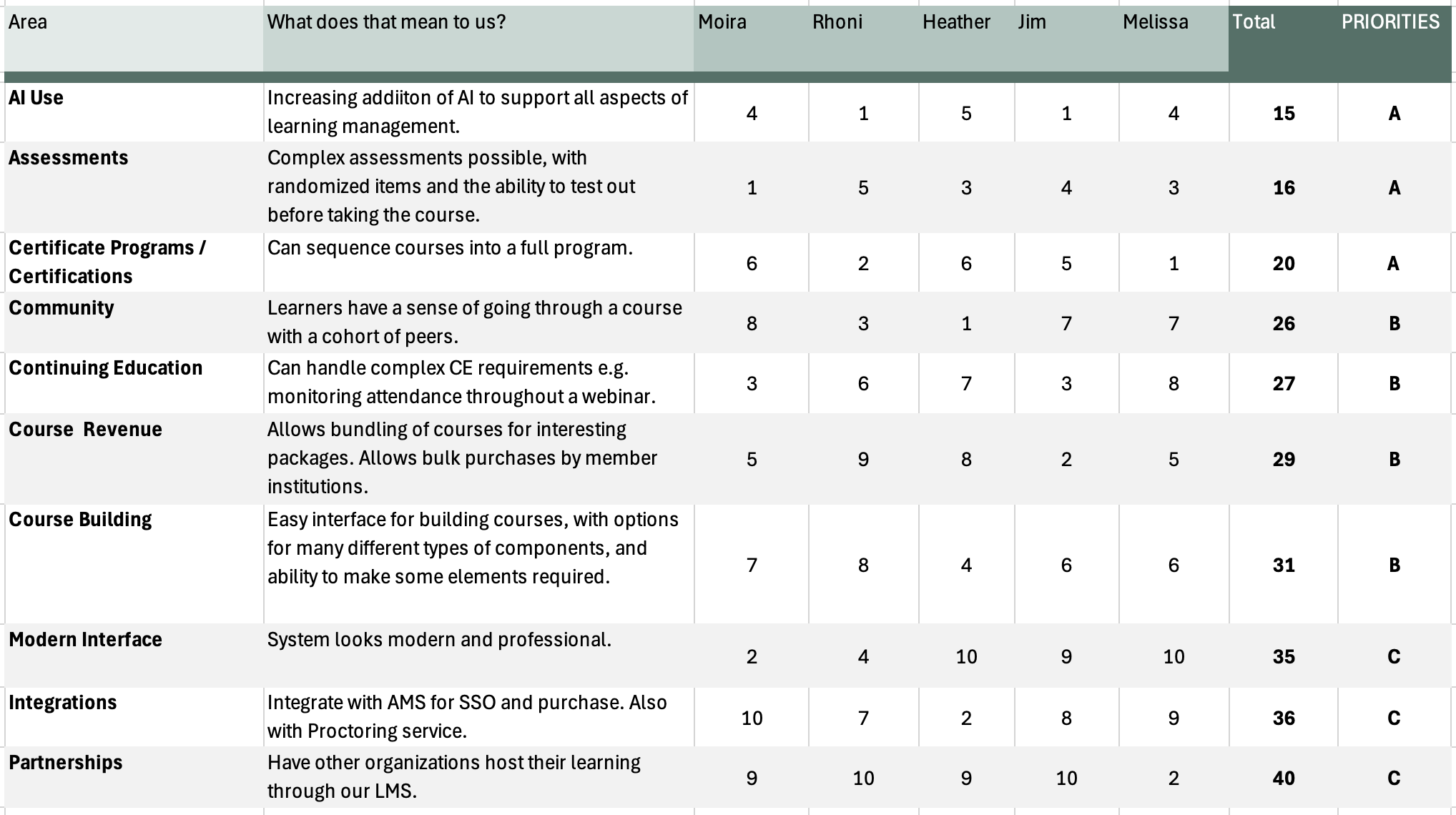
Walking into a demo without a prioritized feature list is like grocery shopping hungry — you’ll come home with everything that looked good and might miss out on what you actually needed. Here’s the process we recommend:
- Identify your top 10 features that matter to your organization.
- Have everyone on your team rank them 1–10 (ranking, not scoring — it forces real prioritization).
- Add up the scores and sort to reveal your A, B, and C priorities.
- Use this as your shared lens for every demo you attend.
Download our LMS Feature Ranking Spreadsheet to get yourself started.
We shared this tools during the webinar — it’s a game changer for building alignment and finding a pathway forward.
Tip 6: Know Your Integration Needs — and the Three Levels
LMS integration with your AMS is not one-size-fits-all. There are three levels, and knowing which one your organization needs before demo day will sharpen your evaluation:
- Level 1 — SSO: One login. Table stakes.
- Level 2 — SSO + Purchase: Members purchase in the AMS, enrollment is sent to the LMS, and learners receive login info.
- Level 3 — SSO + Purchase + Completion: Transcripts flow back into the AMS as a central repository. This is what most mature associations need.
Tip 7: Don’t Forget Marketing (or IT) in Your Project Team
Make sure you have the right team at the table, including your friends in marketing! Marketing is consistently one of the most underrepresented voices in LMS selection — and one of the most impacted by the outcome. If your marketing team doesn’t have a seat at the table, you risk ending up with a platform that doesn’t support segmentation, conversion tracking, or the data needed to actually grow your learning program. Bring them in early.
Tip 8: Ask the Questions Vendors Don’t Expect
Demos are designed to impress. To cut through the shine, come prepared with these questions:
- What can I actually customize — and who does that work?
- What is the real, fully loaded cost to get it to what we need?
- How do you prevent data errors like duplicate records?
- Can we export our data if we ever need to leave?
- What does your upgrade process look like?
- How do you train and support us after launch?
Tip 9: Use a Demo Agenda to Stay Focused
Once you’ve done the broad landscape survey at Demo Day, the next step is structured deep-dive demos with your shortlisted vendors. A formal demo agenda keeps your team focused on the features that matter most to you — not just whatever the vendor chooses to highlight.
Pro tip: You can turn the LMS Score Card (above) into a demo agenda easily. Here’s an example: LMS Demo Agenda
Tip 10: Know What ‘Good’ Looks Like Coming Out of events like LMS Demo Days
LMS Demo Days is a landscape survey, not a selection event. Success means:
- You have a clearer picture of what’s available in the market.
- One or two vendors sparked genuine interest.
- You can see real potential for your organization.
- The real work — requirements gathering, RFPs, structured demos — comes after.
What Comes Next: from Demo Days to Decision
Demo Day is the beginning, not the end. Once you’ve surveyed the landscape and have a shortlist of 4–6 vendors that could be a real fit, the serious work begins — and it’s worth doing right.
That means going deep on requirements — not just from your learning team, but from every stakeholder who will be touched by this system:
- Learning needs to understand course building, assessments, member access and revenue streams, and own the product.
- IT needs to understand security, hosting, and integration architecture.
- Operations needs to know how workflows will change and who owns what.
- Finance needs total cost of ownership — licensing, implementation, ongoing support, and what it takes to get the system to where you need it.
- Marketing needs data — segmentation, conversion tracking, and the tools to actually grow and measure the program.
From there, a well-structured RFP process with your shortlisted vendors gives everyone a common basis for comparison — so your final decision is grounded in fit, not just first impressions from a polished demo.
Have Questions?
Whether you’re just starting to think about an LMS or already knee-deep in the evaluation process, we’re glad to talk it through. Reach out to schedule a complimentary 30-minute consult — no strings attached. We help associations like yours navigate these decisions every day, and we love it.